Building RL Environments for CAD
Onboarding guide for CAD engineers. Source: Google Doc.
TL;DR
This is the onboarding guide for CAD engineers who are helping us build our AI training dataset. It covers what a task has to contain, what makes one usable, and why we're building it this way.
We're training an AI to do real mechanical engineering and industrial design work in CAD software. It learns the way a student does: it attempts a task, gets a score, and adjusts, thousands of times per task. That means each task you build is not a CAD model, it has to be testable with a grader. "I made this CAD model" is NOT an RL environment task, because there is no prompt and nothing to grade. "Here is a technical drawing, and I made a parametric CAD model that fits every dimension of this technical drawing" IS an RL environment task, because we can grade the parametric CAD model with respect to how well it matches the technical drawing given. Every task needs to be developed and structured with this specific framework in mind.
What you should be doing (updated Oct 7, 2026)
Every task you build from here on should go through this loop. The aim is to spend your building time only on tasks that today's strongest models genuinely get wrong, because those are the tasks that teach them something.
- Find a weak spot. Design a task you expect GPT-6 Astra, Claude Opus 5.5, or both to be bad at. Lean on what you know from your own work about where CAD tools and the people using them go wrong.
- Clone cad-eval-set and/or
git pull. Alwaysgit pullbefore you start! Section 8.1 covers the setup. - Run both models on it. Give the task (the Before files and the prompt) to Astra and Opus 5.5 with try_model.py in the cad-eval-set repo. Do this before you build the After, the defectives or the checklist.
- Judge how much the result is worth. Score the output by how much of the job it actually does for an engineer. If the task would take a person 10 hours from scratch and the AI's output brings that down to 5, the result is worth 50%. Judge the files the model handed back, not its description of what it did.
- Keep the task only if the AI scores below 60%. At 60% or above the task is too easy to be worth building: go back to step 1 with something harder. Below 60%, go ahead.
- Build the full task. Make the After (the solution), the defective examples and the checklist, following sections 2 to 6.
- Upload everything to Google Drive. Including the task folder and Astra's and Opus 5.5's runs, so the harness team can see exactly what the models produced.
- Repeat. Start the next task at step 1.
Prompt detail when judging the AI
For judging how good an AI is at doing your task, the prompt should be just detailed enough for a human expert to understand it. If you are telling your (experienced, professional) colleague to do the task, what would you say? You can give the AI an extremely long and detailed prompt to create your "After" solution, but for testing, the more details you give it, the better it will be. We don't actually want to tell it word for word how to do the task, as of course if the prompt is detailed enough, it will be able to do it.
BAD prompt:
Create a parametric CAD model of an L-shaped shelf bracket in 6061-T6 aluminum, in mm. Origin at the inside corner, +X along the horizontal arm, +Z up the vertical arm.
Geometry: horizontal arm 152.40, vertical arm 127.00, thickness 6.35, width 38.10. Inside corner fillet R9.525, outside corner fillet R3.175. Centered triangular gusset, 4.7625 thick, 63.50 legs, fillet its joints R1.5875.
Holes: vertical arm gets two #10 counterbored holes (Ø5.10 through, Ø9.80 × 3.05 deep counterbore on the -X face) at Z = 31.75 and 101.60. Horizontal arm gets one 5.10 wide slot, 19.05 center-to-center along X, centered at X = 114.30, with a 0.50 × 45° top chamfer.
Finish: 0.40 × 45° chamfer on all remaining sharp external edges. Deboss "SB-04 REV C" on the +Y face of the vertical arm, Arial Bold, 4.00 cap height, 0.30 deep.
Fully constrain all sketches and name dimensions d_[feature]_[purpose]. Report mass (g), center of mass, and volume. Export STEP AP242, binary STL (0.01 chordal deviation), and an A3 third-angle drawing with front, top, right, and isometric views.
BETTER prompt:
Model a shelf bracket as a basic L shape in 6061 aluminum, about 6 inches along the shelf side and 5 inches up the wall, 1/4 inch thick and an inch and a half wide. I'd like a gusset in the middle so it doesn't flex under load.
On the wall side, put two counterbored holes for No. 10 wood screws, spaced out near the top and bottom. On the shelf side, a single slot toward the end so there's a bit of adjustment when mounting.
Break all the sharp edges, and engrave 'SB-04 REV C' on the wall side.
1. What an RL environment task is
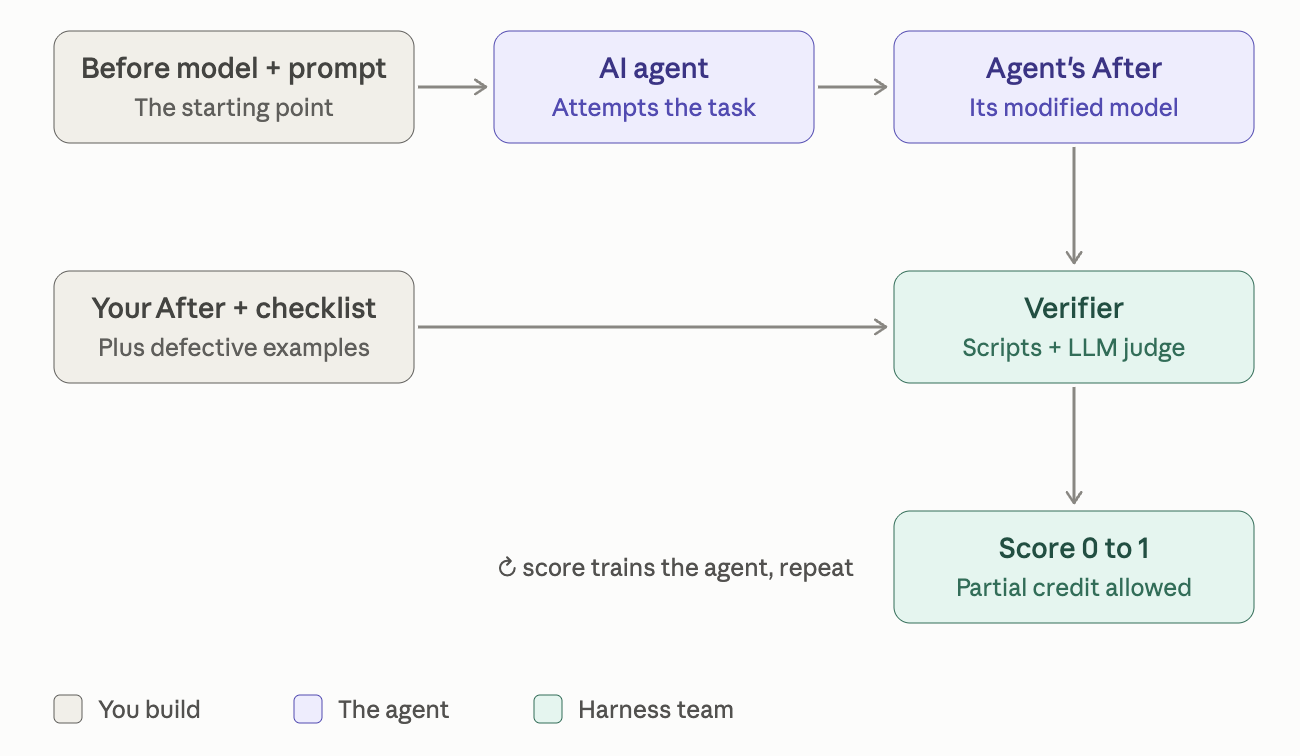
At StoryGold, we are creating Reinforcement Learning (RL) environments. Sometimes this is called "data" or "data points." An AI agent will be given everything in the Before folder with the prompt. The agent makes changes and hands back some files. A verifier (a Python script, an LLM with a rubric, or both) scores the result from 0.0 to 1.0. That score is the training signal. Over thousands of attempts, the agent learns to do CAD work by getting higher scores. The After folder should have a correct answer: files that would score a perfect 1.0 by the verifier. (As a CAD specialist, you don't need to write the verifier.)
Three consequences:
- The score has to be computable from the files the agent hands back.
- All correct solutions must score perfectly, not just the one you built. If there are multiple correct answers, they should ALL be able to get the perfect score.
- Partially correct work must score partial credit.
Instead of thinking about the agent as an AI, think about it as a strong contractor or intern that you trust to do good work. Don't let the thought of "The AI will never be able to do this task" stop you from making a hard task. Pretend it isn't AI, but rather a human who can learn, use the internet, and has many years of context and experience. The point is to create data points that train the future AI, not the current one.
2. File tree
Rules of thumb:
- Do NOT put anything other than what gets passed to the model in the Before folder.
- Do NOT put anything other than what a model outputs in the After folder.
- Each defective example should be a standalone model that has the exact structure as the "After". In other words, each is a defective solution.
<task_name>/
├── checklist.txt
├── Prompt/
│   ├── task.txt
│   └── …other files…
├── Defective/
│   ├── <short_failure_name>/
│   │   └── adversarial.SLDASM (+ parts)
│   ├── <short_failure_name>/
│   │   └── adversarial.SLDASM (+ parts)
│   └── ...
├── Before/
│   ├── input.SLDASM           # Top-level assembly (or part file)
│   ├── input.PNG
│   ├── *.SLDASM
│   └── *.SLDPRT
└── After/
    ├── solution.SLDASM
    ├── solution.PNG
    ├── *.SLDASM
    └── *.SLDPRT
| Piece | What it is | What it is for |
|---|---|---|
| Before | The starting model. Parametric assembly or part, or a mesh/STEP if the task is about working with dumb geometry. | The agent's starting state. Must be complete and healthy (or deliberately broken only in ways the task is about). |
| Prompt | The request, written the way a real customer, PM, or lead engineer would write it, plus any attachments. | The only information the agent gets. If a requirement isn't in here, the agent can't be blamed for missing it and the verifier can't fairly check it. |
| After | Your reference solution. One working, full-score solution. | Proof the task is achievable, and a worked example the harness team uses to figure out what to measure. It is one correct answer, not the correct answer. |
| Checklist | The requirements broken into checkable items with weights. | The harness's specs. |
| Defective | 3–6 wrong solutions, each wrong in a specific, documented way. | Test cases for the verifier. If the harness gives a defective a perfect score, the harness is broken. |
3. The one question to ask before you build anything
If I handed the Before and the prompt to three competent CAD engineers, would all three produce something a script or a rubric could score, and would all three receive full marks if they did good work?
If any part of that is "no," fix the task before modeling.
- "They'd all do something widely different and it would be hard to say which one is better" → the prompt is under-specified, which will make verification hard. Add constraints.
- "They won't have enough information to create what I want" → Add more information, like images or more information in the prompt. Whatever you would give to an actual human engineer.
- "It's easier for me to just do the task than to describe what I want to others" → The task is too easy compared to how hard it is to write the prompt. Create a harder task that requires more work and is easier to write the prompt for.
4. Writing a verifiable prompt
4.1 State requirements as things that can be measured
The agent's output is a set of SolidWorks files. A verifier can open those files (via the API or exported STEP/properties) and inspect them. Here is roughly what a script can check deterministically:
- Geometry: mass, volume, surface area, center of mass, bounding box, wall thickness at sampled points, minimum radius, draft angle on selected faces
- Topology: number of bodies, face/edge counts, hole count and diameter, thread callouts (Hole Wizard data)
- Assembly: component count, mate types and mate references, interference detection results, collision/clearance between named components, degrees of freedom
- Model health: rebuild errors/warnings, dangling references, broken mates, suppressed features
- Feature tree: presence/absence of specific feature types (sheet metal flat pattern, shell, pattern, configuration), feature count, external references
- Metadata: custom properties, material assignment, configurations and their values, part numbers, filenames
- Drawings/docs: sheets present, views present, dimensions/notes present, BOM rows and columns
- Comparison to reference: a named face/feature unchanged (untouched geometry stays identical), or changed within tolerance
An LLM judge can additionally evaluate things a script can't cleanly:
- Whether a model is parametric
- Whether things that shouldn't be changed have been changed
- Whether a design choice is reasonable given stated constraints
- Whether something "looks like" a common daily object, etc.
5. The checklist: designing for partial credit
This file tells the harness team what to measure and how much each thing matters.
Example:
## Requirement 1 — Fastener load capacity
Check: Every bolt in the flange joint is ISO 4762. Combined tensile
capacity at yield (class 8.8) ≥ 2.5 × 12 kN.
How to check: Enumerate bolt parts mated to the flange; read
thread size from Hole Wizard / part name / custom property;
compute capacity. Deterministic.
Passes if: capacity ≥ 30 kN.
Partial: none — this is pass/fail.

## Requirement 2 — Minimize bolt count
Check: bolt count ≤ N_min + 1, where N_min is the smallest count
that satisfies Req 1 for any ISO 4762 size M5–M12.
Partial: full credit at N_min, half credit at N_min + 1, zero above.

## Requirement 3 — No interference
Check: Interference detection on the assembly returns zero
interferences among {flange_A, flange_B, bolts, nuts}. Deterministic.

## Requirement 4 — Untouched geometry preserved
Check: flange_A and flange_B outer profiles, bore, and mounting
faces are geometrically identical to Before (compare STEP export;
tolerance 0.01 mm). Only the bolt-hole pattern may change.

## Requirement 5 — Bolt spacing follows good practice
Check: Bolt pitch ≥ 2.5d, edge distance ≥ 1.5d. Deterministic.
Partial: proportional to fraction of bolts satisfying both.

## Requirement 6 — Rationale documented
Check: calc.md exists and shows load path, chosen size/count, and
safety factor arithmetic that matches the model. LLM-judged.
Partial: LLM rubric 0–10.
IMPORTANT: Repeating base models
For the sake of creating difficult and varied RL environment tasks, do NOT repeat a base model between two tasks. If you have two interesting modifications you want to make to one base model, just combine the task into two parts. It's okay if the tasks have multiple parts; it can make it more difficult and interesting, as long as the modifications do not contradict each other.
IMPORTANT: Complexity of the task
The chosen model must be (or resemble) a real engineering task, not a demonstration / toy example. The assembly (or the part file) should have at least 100+ faces. Complexity should be enough that the TASK itself takes a professional engineer 2–6 hours of real work. This is not including building the Before model, but rather the changes that take a Before to an After. Below are some examples of Before models that are complex enough.
8. Run AI on the task before you build the After
Before you make the After, the defectives or the checklist, run GPT-5 Astra or Claude Fable 5.1 on your Before and prompt. If the model gets more than about 60% (eye-balling the result) of the task right, the task is too easy and must be made harder before you go further. Tasks have been getting too easy: models solve many of them on the first try, and a task the model already solves teaches it nothing. Make sure you test many things before determining the AI's score; a model may LOOK right, but have no internal details, articulation, correct feature tree, well-assembled parts, etc.
IMPORTANT: Check if tasks are too easy for AI before building
Do not start the After, the defectives or the checklist until the task has passed a GPT-5 Astra or Claude Fable 5.1 run. Harness builders: if the task has not been run on AI yet, run it before you build the harness.
8.1 Set up the test repo (once)
The tool lives in the cad-eval-set repo. Its README has the full walkthrough and troubleshooting. Ask Jennifer for the .env file; you'll need it to get the keys to run AI models like GPT and Claude.
IMPORTANT: For SolidWorks engineers ONLY
Running AI requires you to have SolidWorks open, and it takes over your SolidWorks so you can't do anything else. After you install this and get the hang of it, you should ask Jennifer for a virtual machine to run the AI tests.
This does not apply if your tasks are in FreeCAD or CadQuery.
8.2 Judge the result
Each run creates a folder under your task's _runs\ folder. Open after\ in SolidWorks to see what the model built, and read raw_response.md for what it says it did.
| What you see | What it means | What to do |
|---|---|---|
| Any run gets more than ~60% of the task right | Too easy | Make the task harder and run again, or delete the task and create a new one |
| It couldn't open the file, got stuck, or saved nothing | A setup problem, not a hard task | Fix the input files or prompt and run again |
| Every run gets ~60% or less right | Hard enough (under 20% is ideal) | Build the After, checklist and defectives |
9. Patterns that are NOT RL environments
A task whose answer is a design opinion. "Improve the ergonomics of this handle." Unless you can pin ergonomics to numbers (grip diameter range, minimum radius, a reference hand form the model must clear), there's no reward signal.
The After changes things outside the task scope. Don't tidy up some unrelated features in the After only. Change it in the Before as well.
Defective examples that change things outside of the task scope. Same reasoning as above.
10. Worked example: bolt count/size optimization
P11 - Optimizing the number of bolts
Before:
A Raspberry Pi 4 sitting in a two-part moulded enclosure that closes on snap hooks. Four files: input.SLDASM, input.PNG, Enclosure.SLDPRT, Raspberry Pi 4 model B.SLDPRT. It opens clean, with no missing references.
Note what the Pi is doing in there. The prompt says the connection must not hinder the PCB, and the only way a verifier can check that is if the board is in the assembly to clash against. If a constraint is about not hitting something, that something has to be in the Before.
Prompt (task.txt):
"You have a raspberry pi with an enclosure that uses snap fits. Change that enclosure to a bolted connection, Use metal inserts for threads and use a minimum number of bolted connections enough to fix the enclosure safely and prevent any edges from opening and not hinder the pcb."
Three sentences, written the way a lead engineer briefs someone. It names the change, the method (metal inserts), and the constraints (minimum count, seam stays shut, do not foul the board). It does not say what size bolt, how many, or where, because the AI (or the engineer) should be able to figure that out by looking at the model and using their common knowledge / internet.
After:
This is one correct solution. solution.SLDASM plus the same four parts, with the snaps taken out of the enclosure, insert bosses and clearance holes added, four heat-set inserts, and four countersunk screws sitting flush in the outer face.
Worth noticing: the After render looks almost identical to the Before render. The heads are flush and the seam is on the side. That is fine, because the grading reads geometry rather than pictures.
Checklist (8 items, 1 point each):
- Snap joints removed
- Minimum number of bolt holes added to the enclosure
- Metal threaded inserts added
- Bolts added
- Bolts do not intersect with the pcb
- Bolts do not intersect with enclosure bottom nubs
- Bolt heads sit flush with enclosure
- Bolts fit insert threads
Why this is a good environment:
- The task sounds like one that an engineer might actually need to execute in their daily job.
- The task is objective enough that correct answers can be tested, while subjective enough that there are multiple correct answers that can all be tested. (There doesn't need to be multiple correct answers, but it's okay if there are as long as they can all be verified.)
- The "After" model is only changed in the way the prompt specifies, and is otherwise exactly the same as the "Before." No names are changed, nothing in the feature tree is changed, etc.
- This task tests a very realistic modification in a mechanical engineering workflow. In fact, it hits a few ontology categories that have very few tasks: "Bolt count/size optimization for joints", "FEA/simulation setup (defeaturing, loads, constraints)", and "Internal pressure (steam, carbonation)."
- The prompt is not too specific. It doesn't say how to perform the task. The prompt does not take longer to write (for a human) than it is to actually execute.
- "Before" and "After" models are clean of feature tree errors, import errors, and other problems, especially since these issues are NOT relevant to the prompt.
- The task is well-contained and does not have a lot of butterfly effect (modification on top of modification leading to a lot of divergence of possible solutions), yet difficult enough to take 2–6 hours for a human engineer.
Defectives:
Seven, each wrong in exactly one documented way, each built from the Before:
snap_joints_not_removed: rim still in five pieces.bolt_caps_too_large_for_enclosure: socket head stands 2.05 mm proud.bottom_nubs_compromised_by_bolts: 6.22 cubic mm of bolt inside the enclosure.rebuild_errors: mates adrift, two feature errors.bolts_intersect_raspberry_pi: screw twice too big, so it hits both board and shell.metal_inserts_not_used: screwed straight into plastic.not_enough_bolted_connections: its snaps are gone and its rim is closed. Its inserts are pressed into their bosses. Its screws fit the bores exactly, 1.00 mm into 1.00 mm. Its heads sit 0.07 mm below the outer face. It touches neither the board nor the shell. Its feature tree is clean. It passes seven of the eight ticks outright, and in a render it is indistinguishable from the reference. What is wrong with it is that both bolts are at the same station down one long side of a 92 mm box, so a 60 mm run of seam at the far end has nothing holding it. It would pop open in your hand.
This is what defective models are for. Defective models are the test cases that prove the harness is good at its job of catching common modeling errors that are related to the task prompt.
12. Ontology reference
Before you start, pick (or be assigned) the sub-category before designing the task, and design toward what that sub-category implies is verifiable. See [Internal] OpenAI x StoryGold Eval Set for the ontology.
Some sub-categories are harder to make verifiable than others (Class-A surfacing, ergonomics, concept modeling). They're not off-limits, but expect to spend more time converting the intent into measurable criteria, and to lean more on LLM judging.
13. FAQ
Moved to the FAQ page.
Questions? Ask before building.